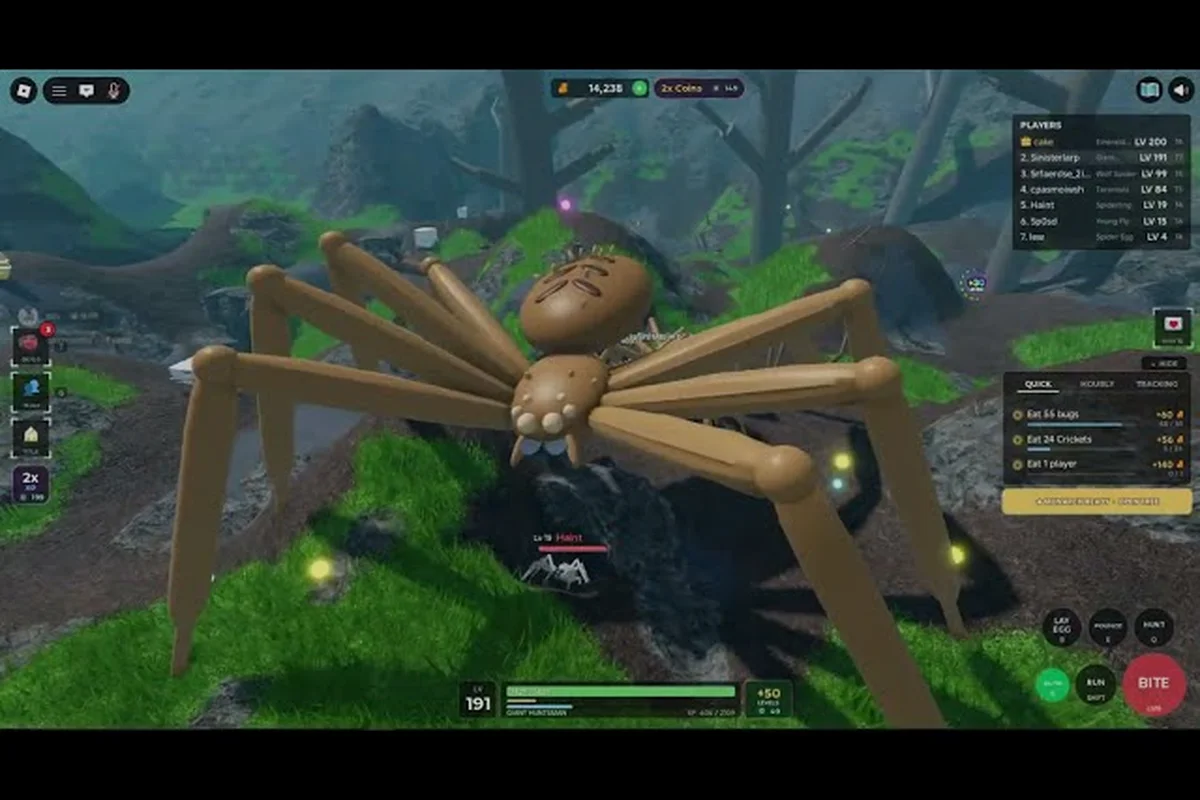
Bug evolution insect size determines how a creature looks and progresses, but the roster is easier to understand through level gates, Bug Tree branches, and stat growth. A Housefly starts a new session, while spiders and other forms become available as the insect levels up.
How Insect Size Relates to Growth
Bug Evolution insect size changes as your creature eats, levels up, and moves through the Bug Tree. The game’s current materials advertise 30+ insect forms, so the roster is still described as an expanding collection rather than a final, numbered list. Understanding size progression helps players recognize which stage they have reached and which forms are still locked.
The opening creature is the Housefly, which appears in the example evolution bar at Level 1. Players then move toward a Spider at Level 10, a red-and-white Spider at Level 20, and a white-fluffy Spider at Level 30. These visible examples establish the main progression pattern: early levels lead into the spider branch, while deeper Bug Tree rows reveal more unusual and prehistoric forms.
| Progression point | Example form | What it shows |
|---|---|---|
| Level 1 | Housefly | Starting insect and early-game baseline |
| Level 10 | Spider | First major spider evolution |
| Level 20 | Red-and-white Spider | Mid-game branch form |
| Level 30 | White-fluffy Spider | Late visible spider form |
| Deeper rows | Unknown forms | Locked progression beyond the shown examples |
Size alone does not establish the strongest creature. Each insect uses the same five-stat panel: Speed, Health, Bite Damage, Bite Speed, and Stamina. A larger visual form may have more health or damage, but the numbers must be checked before assuming it is the better choice for every route.
What Bug Tree Levels Actually Mean
The Bug Tree is the central progression system for bug evolution unlockable insects, rather than a conventional shop where every creature can be purchased immediately. Reaching a level milestone unlocks access to a position on the tree, and players must then follow the appropriate branch or spend progression resources to claim the form.
Community footage and interface examples show hidden nodes at tiers T4 through T6. Those question-mark entries indicate forms that exist within the progression structure but have not been fully identified in current public materials. This is why an exact, named list of every insect would be less accurate than describing the advertised roster as 30+ forms.
The Five Stats Behind Visible Size
Every listed insect can be compared through the same attributes, which makes the stat panel more dependable than visual size alone. Comparing Speed, Health, Bite Damage, Bite Speed, and Stamina reveals why a larger unlockable insect may not always be the stronger choice: size can signal potential, while the stat spread determines whether that insect handles food collection, danger avoidance, or sustained attacking more effectively. These are the available categories:
| Stat | What it affects | Why it matters during progression |
|---|---|---|
| Speed | Movement across the map | Helps with food collection and avoiding danger |
| Health | Damage taken before defeat | Supports direct encounters and late-game survival |
| Bite Damage | Power of each bite | Helps determine the value of an attacking build |
| Bite Speed | Rate of biting | Influences how quickly damage is applied |
| Stamina | Repeated activity capacity | Supports longer periods of movement and feeding |
Growth adds into these attributes as the insect levels, eats scattered food, and spends coins on upgrades. Because insect size is tied to progression rather than a standalone combat rating, the Housefly can still serve as the baseline for understanding every later form.
Bug Evolution Insect Roster and Unlockable Forms
The bug evolution insect roster spans common-looking insects, colorful spider variants, hopper-style forms, and large prehistoric creatures. Confirmed forms include the Housefly, several fly variants, the Spider, a red-and-white Spider, Moth, Grasshopper, Tarantula, Black Widow, and Locust. Other entries remain hidden behind question-mark nodes.
The collection is organized by Bug Tree tier, not by official rarity labels. Although tiers such as Common, Rare, or Legendary are familiar from many games, Bug Evolution does not currently use those grades for its insects. Any ranking of the roster should therefore be described as community-inferred rather than official balance data.
| Confirmed insect or group | Branch or position | Known role in the collection |
|---|---|---|
| Housefly | Level 1 opening form | Earliest visible progression stage |
| Fly variants | Early and mid branches | Mobile starter options |
| Spider | Level 10 | Entry into the central spider branch |
| Red-and-white Spider | Level 20 | Recognizable mid-game form |
| White-fluffy Spider | Level 30 | Deeper visible spider form |
| Moth | Confirmed roster entry | Flying insect option |
| Grasshopper | Confirmed roster entry | Hopper-style form |
| Locust | T3 branch form | Branching option away from spiders |
| Black Widow | T3 branch form | High-damage spider option |
| Tarantula | Deep spider branch | Large prehistoric-looking form |
A broader catalog of every known Bug Evolution insect is useful when comparing names across branches. That catalog can serve as a reference, while the Bug Tree remains the best source for deciding which forms unlock after your current level.
Early, Mid-Game, and Late-Run Families
The first phase centers on the Housefly and other fly variants. Their main value is access to food and practice with the five-stat interface. The Housefly is not a premium or hidden starter; it is the normal starting point shown in current gameplay examples.
The second phase centers on spiders, including the red-and-white and white-fluffy variants. The third tier creates the first substantial branch because Locust and Black Widow occupy separate paths. Choosing Black Widow preserves a spider-focused direction, while Locust moves the run toward hopper and flying insects. Once that choice is made, later progression follows a different route.
Deeper tiers contain the Tarantula and additional prehistoric-looking creatures. Their silhouettes and positions suggest greater physical scale, but exact stat values have not been published by the developers. A comprehensive collection overview and insect count can clarify how the confirmed entries fit into the advertised 30-plus collection.
Why the Premium Spider Tab Is Separate
The interface contains a Robux Spiders tab for premium spider options. Its presence confirms that some spider-related forms sit outside the ordinary progression list, but the current public screen does not reveal the full contents or exact prices of that section.
Because those details are unverified, premium forms should not be added to a completed Bug Tree roster without direct evidence. Likewise, a large premium spider may look powerful but cannot be ranked accurately until its health, damage, speed, bite rate, and stamina are visible. The main bug evolution spider progression remains the regular Bug Tree unless the developers publish otherwise.
Bug Evolution Housefly and Spider Size Stages
The bug evolution housefly is the clearest reference point for understanding insect size because it appears at Level 1 in the example bar. Its small stature matches the game’s survival loop: players begin as a tiny insect, search a grassy open map for scattered food, and grow by consuming available resources.
The Housefly is the weakest practical starting form in the current experience, but “weakest” does not mean useless. It provides access to the map, food collection, leveling, and the five-stat panel. More importantly, it makes later upgrades visible. When the insect changes into the Spider at Level 10, the player can compare the same interface categories against the new form.
| Comparison point | Housefly | Spider |
|---|---|---|
| Level milestone | Level 1 | Level 10 |
| Collection role | Starting baseline | First major spider form |
| Physical scale | Smallest confirmed example | Larger than the starting form |
| Progression purpose | Teaches gathering and leveling | Marks the spider branch entrance |
| Exact official stats | Not published | Not published |
The Spider route continues into the red-and-white Spider at Level 20 and the white-fluffy Spider at Level 30. Because insect size changes visibly across those milestones, players can use the transformation as a quick check on whether progression is behaving normally.
Reading the HUD After Every Evolution
After evolving, compare the five bars rather than assuming the larger silhouette received a balanced upgrade. Speed may lag behind health, while bite damage may rise without an equal gain in bite speed or stamina. A build that attacks aggressively can still run out of stamina, whereas a durable form may remain too slow to collect food efficiently.
A practical post-evolution check includes reading each HUD bar as a separate performance test rather than judging the insect by size alone. For example, a larger bug evolution insect may show higher health and bite damage while its movement speed drops, making food collection less efficient; a smaller bug evolution spider or housefly can therefore outperform a bulkier form in short chases when stamina or bite speed is the deciding factor. Treat these readings as a build-specific comparison, since unlocked insects and roster balance can change with updates.
-
Confirm that the selected insect name matches the new form.
-
Note the movement speed before crossing the map.
-
Watch the bite animation to compare bite speed.
-
Track health during the next encounter.
-
Compare stamina loss while chasing food.
-
Record coins spent on upgrades separately from the evolution itself.
This routine is especially useful when bug evolution insects are updated, because the visible roster can expand faster than official numeric documentation. Your own HUD readings remain version-specific observations rather than permanent official statistics. For example, if a newly unlocked bug evolution spider has a higher health bar than a bug evolution housefly but loses movement speed, record both values before deciding which form fits a food-gathering route. Likewise, changes to the bug evolution insect roster can alter upgrade priorities without announcing new balance values, making dated HUD notes a practical comparison baseline rather than proof of permanent stats.
Does Bigger Mean More Useful?
No. Larger forms generally look more imposing, but usefulness depends on the encounter and the route. Speed can determine whether you reach food first, while health and stamina influence how long you can remain active. Bite damage and bite speed only matter if opponents make close combat relevant.
A large prehistoric-looking creature may excel at direct contests but feel awkward while gathering. A smaller flying or hopping form may offer better movement and a different route through the map. Until the developers publish full stat values, the safe conclusion is that insect size is a visual and progression signal, not a complete ranking metric.
Bug Evolution Unlockable Insects by Bug Tree Tier
Bug evolution unlockable insects follow level milestones and Bug Tree positions. The visible examples begin at Level 1 and progress through Levels 10, 20, and 30, while hidden nodes indicate additional tiers. This makes the tree a practical roadmap: check your level, inspect the reachable nodes, and decide which branch fits the run you want.
| Bug Tree tier | Confirmed or visible information | Unlock context |
|---|---|---|
| Early tier | Housefly and fly variants | Starting levels, with Housefly shown at Level 1 |
| T2 | Spider shown at Level 10 | First clear spider upgrade |
| T3 | Locust and Black Widow branch | Major path decision |
| T4 | Hidden nodes shown as ??? | Requires deeper progression |
| T5 | Hidden nodes shown as ??? | Later locked content |
| T6 | Hidden nodes shown as ??? | Deepest visible tree area |
The bug evolution spider route is therefore not a straight line with one final destination. Black Widow occupies one T3 position, the Tarantula sits deeper in the spider branch, and premium spiders appear in a separate Robux section. To understand the full progression order, the fastest evolution route guide examines how players can reach new tiers efficiently.
Choosing Locust or Black Widow
The T3 split is the first major build decision because it changes the remainder of the run. Locust moves toward flying and hopper-style insects, whereas Black Widow keeps the progression within the spider branch. Neither option has official rarity grades or confirmed balance numbers.
Community discussion often presents the Black Widow line as a strong choice for bite damage, but that is an informed player assessment rather than a published statistic. Before choosing, compare your current stats, the form’s visible bars, and the branches available afterward. If your existing Spider build already emphasizes health and damage, Black Widow may feel like a natural continuation; if movement is weak, Locust may offer a more useful change of pace.
Following Locked Nodes Without Guesswork
Hidden nodes should remain labeled as unknown until gameplay or official information identifies them. Common guesses based on color, silhouette, or title art are not evidence. The same rule applies to the Robux Spiders tab, where premium entries may exist without enough visible information to document the full lineup.
To make progress without wasting resources, track each insect’s five stat bars—Health, Damage, Speed, Weight, and Size—rather than assuming the largest-looking creature is strongest. For example, a Housefly unlock can raise basic survivability and speed without matching a Robux Spider’s damage or overall size. Because tier changes affect the cost and power of the next node, compare the newly revealed values first; this keeps Bug Evolution insect upgrades affordable while helping identify when a branch is worth spending coins on.
-
Reach the required level before inspecting a locked node.
-
Follow the closest visible branch from the current insect.
-
Compare the destination’s five bars after unlocking.
-
Save coins when the next option is unclear.
-
Record any newly revealed name and tier for future runs.
-
Compare the result with community-tested routes before committing.
Bug Evolution Insects: Growth, Upgrades, and Strategy
The bug evolution insects grow through a simple loop: collect scattered food, consume it, gain levels, unlock Bug Tree positions, and spend coins on upgrades. Since growth adds into the five stats, the best progression strategy is to avoid treating level as a separate score that can be ignored. More levels usually mean more resources and access, but the combat value depends on how those gains are distributed.
| Progression action | Direct benefit | Strategic purpose |
|---|---|---|
| Eat scattered food | Adds growth and supports leveling | Reach new level milestones |
| Gain levels | Unlocks tree positions | Access additional forms |
| Follow a branch | Replaces the current insect | Define the run’s future options |
| Spend coins on upgrades | Improves attributes | Strengthen a chosen build |
| Compare stat bars | Reveals current weaknesses | Decide between branches and upgrades |
Coins are valuable because they can improve a form without changing its identity. When a player knows which branch they want, saving part of the food budget for upgrades can produce a more balanced insect than rushing every available evolution.
Build Around the Weakest Bar
A common mistake is to watch only health or damage while ignoring the rest of the panel. If speed is the lowest bar, gather more aggressively because movement affects food access. If stamina is low, repeated attacks may be more valuable than a single powerful bite. When bite speed trails, upgrading around it may produce a better practical fighter.
A short progression log can make these comparisons clearer: record the insect form, size multiplier, health, damage, speed, stamina, and bite speed at each stage, then compare upgrades against the weakest bar rather than the largest displayed insect. For example, if Housefly reaches Spider with a size increase but slower movement, its stronger health may still fail against targets that require fast repositioning; a Locust build may therefore outperform a heavier branch even when its damage is lower. Tracking the same fields after each evolution reveals whether growth came from a genuine stat gain, a branch choice, or an upgrade whose practical value depends on movement and bite speed.
| Session stage | Record these values | Decision to make |
|---|---|---|
| After Housefly | All five bars | Choose a useful early upgrade |
| After first Spider | Size change and stat gains | Continue spider path or switch branch |
| At T3 split | Locust versus Black Widow | Compare movement and bite profile |
| At deeper tiers | Hidden node and upgrade cost | Save resources before committing |
Because this is a new 2026 Roblox release, balance changes and menu adjustments may occur. Player reports are most useful when they include the form name, level, date, and visible bars. The community insect tier list can then separate community opinion from the fewer facts the developers have published.
Practical Priorities for New Sessions
The Housefly should be used to learn where food appears and how quickly the first levels arrive. Avoid delaying early upgrades so heavily that movement becomes a problem. Once the Spider is available, check the five bars again because the transformation may favor attack, mobility, or endurance rather than increasing every stat evenly.
At the T3 decision, observe both branches before committing. The guide’s strongest-spider analysis provides a community-oriented framework for comparing spiders, but remember that exact values and tier placement can change between updates. Save enough coins for the chosen branch, and revisit the stat panel immediately after evolving.
Bugs, Discrepancies, and Missing Information
Several issues can make the bug evolution insect roster appear inconsistent. The largest source of confusion is the difference between a confirmed form, a visible but unnamed node, and a premium spider shown only inside a tab. Each category should be labeled differently until the developers provide clearer information.
| Observed issue | Why it causes confusion | Best interpretation |
|---|---|---|
| 30+ forms advertised | No exact final total is displayed | Treat the collection as expandable |
| ??? nodes | Hidden forms cannot be identified by appearance alone | Leave them unidentified |
| Robux Spiders tab | Full lineup and prices are not public | Label premium options as unverified |
| No rarity grades | Tiers are tree positions, not rarity ratings | Do not invent Common or Legendary labels |
| Large visual scale | Exact stat values are absent | Never equate size with power |
| Rapid early access | New 2026 game content may change | Record the date of observations |
The Missing Exact Insect Total
The current advertisement uses 30+, which is a useful upper indication but not a reliable count of every form. Some entries may be premium, hidden, or added in future updates. Any article claiming an exact total should identify its source and date; otherwise, “30+ insects” is the accurate phrasing.
The Premium Spider Information Gap
Premium spiders deserve a separate mention because they can appear to contradict the regular progression list. They may be unlockable through Robux rather than levels, but the public interface does not provide enough detail to state their prices or complete lineup. Treat them as unverified premium entries, not confirmed Bug Tree milestones.
Size-Related Bug Checks
If an insect appears larger but seems slower, that may be a valid stat distribution rather than a display error. Compare the HUD before and after evolving, then repeat the same movement and bite tests. If the name, level, or menu position does not match the expected progression, restarting may clear a temporary interface issue.
Record the platform, client version, insect name, level, and visible stats when documenting a bug. Community reports become much more useful when they show what happened before and after the transformation. This approach separates actual bug evolution insect size anomalies from normal differences in speed, health, stamina, or bite behavior.
Frequently Asked Questions
What is the bug evolution insect size of the Housefly?
The Housefly is the smallest confirmed opening form in the current progression examples, appearing at Level 1. The game does not publish a numeric size unit, so it cannot be compared with spiders using an official measurement. Its practical importance comes from being the starter creature that introduces gathering, leveling, upgrades, and the five-stat panel.
Which bug evolution spider appears at Level 30?
The current example evolution bar shows a white-fluffy Spider at Level 30. Earlier visible milestones include the Spider at Level 10 and a red-and-white Spider at Level 20. These are interface examples rather than a complete list, because deeper T4 through T6 nodes remain shown as question marks.
Does a larger insect always have better stats in Bug Evolution?
No. Bug Evolution compares insects using Speed, Health, Bite Damage, Bite Speed, and Stamina. A larger-looking Tarantula or prehistoric form may be durable, but official numerical values are not published. Check all five bars and your run’s goals before treating visual scale as a strength ranking.
How many insects are available in Bug Evolution?
The current store information advertises more than 30 forms, but an exact total has not been confirmed. Confirmed names include the Housefly, several flies, Spider variants, Moth, Grasshopper, Tarantula, Black Widow, and Locust. Hidden Bug Tree nodes and the incomplete Robux Spiders section make “30+” the most defensible description.
Are the Robux Spiders part of the normal Bug Tree roster?
Their placement is separate from the regular level-based Bug Tree, and the public interface does not reveal the full premium lineup or exact prices. They should not be counted as confirmed level milestones without additional information. Players should compare their visible stats and costs before unlocking any premium form.
The clearest way to understand Bug Evolution insect size is to treat it as one part of progression: size changes mark growth, while the five-stat panel determines practical performance. Start with the Housefly baseline, follow the tree through its level gates, compare the T3 branches carefully, and treat hidden or premium entries as unverified until the game provides concrete details.