Bug Evolution controls are easy to learn but easier to master when every movement, bite, camera action, and menu icon has a clear purpose. Learn the PC setup, read the interface at a glance, and use smarter habits to grow, fight, and evolve with less wasted effort.
Bug Evolution PC Controls and the Core Game Loop
Bug Evolution follows a familiar Roblox survival loop: hatch as a small insect, eat scattered food, gain levels, collect coins, and evolve through the Bug Tree. The 15-player server adds competition, but the first few minutes are mostly about learning how your insect moves and how the interface communicates progress.
On PC, movement uses WASD or the arrow keys, the mouse rotates the camera, and a mouse click or keyboard action performs the primary bite or eat input. Because the game uses Roblox’s standard input system and does not currently include a custom keymap screen, learning the default behavior is essential.
| Action | PC input | Practical purpose |
|---|---|---|
| Move | WASD or arrow keys | Travel between food, enemies, and safe areas |
| Rotate camera | Mouse movement | Find nearby targets and plan escape routes |
| Bite or eat | Mouse click or assigned action key | Collect food and attack other insects |
| Open interface | Roblox menu key or on-screen button | Access the Bugs tab, Bug Tree, and related menus |
| Buy an upgrade | Click the relevant shop option | Spend coins on combat attributes |
| Evolve | Open the Bug Tree and select a node | Change into a stronger insect form |
The first practical objective is not chasing the biggest creature immediately. Eat nearby food until reaching Level 10, unlock the spider form, and spend coins on Bite Damage level 1 if available. That sequence creates a basic combat foundation before you push farther into the map.
Reading the HUD at a Glance
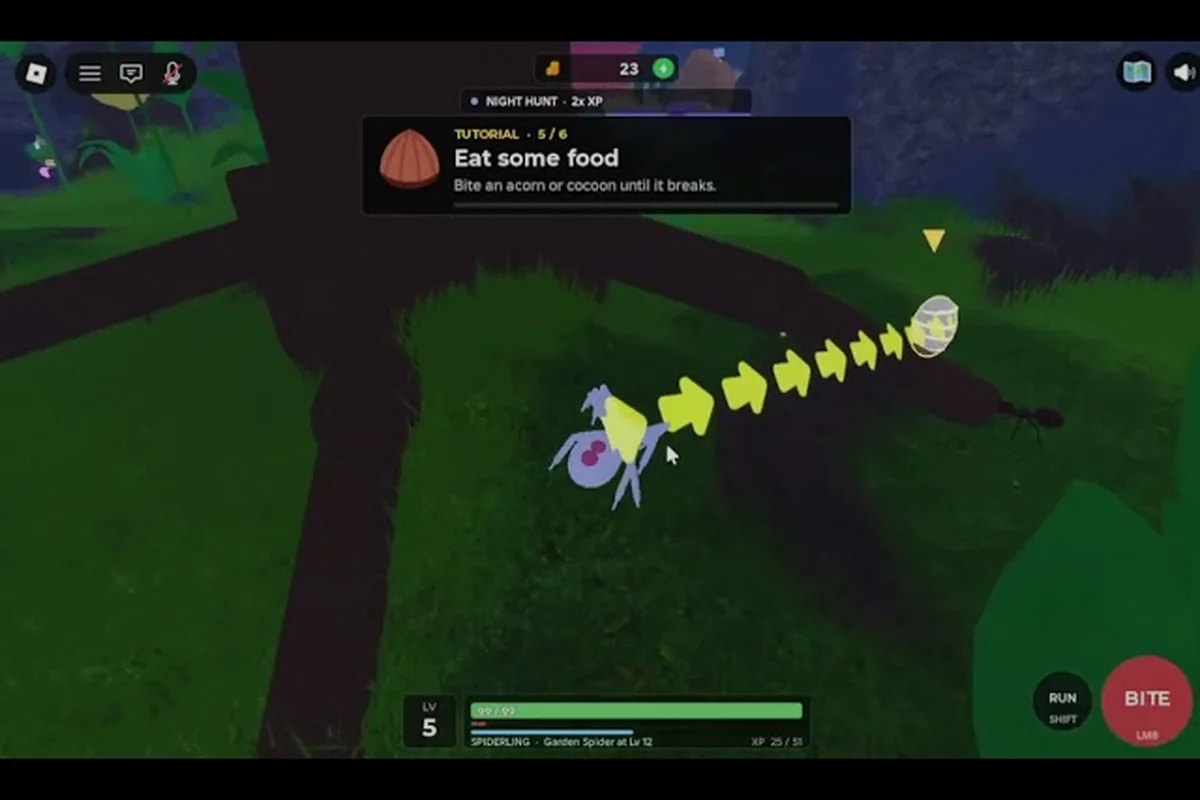
The HUD is the quickest way to understand what your insect is doing. The interface presents five attribute bars: Speed, Health, Bite Damage, Bite Speed, and Stamina. A separate gold coin display tracks available currency, while the insect name and current level identify your present form.
| HUD element | What it tells you | When to check it |
|---|---|---|
| Speed | How quickly you can travel | Before crossing exposed terrain |
| Health | How much damage you can withstand | After a difficult fight |
| Bite Damage | How hard each hit lands | Before committing to combat |
| Bite Speed | How quickly you can attack | When a fight starts lasting too long |
| Stamina | How long you can sustain movement and attacks | When chasing food or retreating |
| Gold coins | Upgrade and evolution currency | Before opening the Bug Tree |
| Insect name and level | Current form and progression | After every food pickup |
These bars are small, but their placement allows you to monitor growth without opening a menu. A rising gold coin bar means your recent actions produced currency; a depleted Stamina bar suggests you should disengage rather than continue a losing chase.
For a deeper explanation of why those values matter, the food and growth system guide explains how eating and development affect your available stat upgrades. For example, food determines the resources you can spend in the Bug Tree, while growth stages can change which Bite Damage, Speed, or Stamina improvements are worth prioritizing. This matters when reading the HUD because a higher attribute is only useful if your current insect can convert it into better movement, attacks, or survival.
Bug Evolution UI Explained: Menus, Icons, and Progress Indicators
The Bug Evolution UI explained in this guide comes down to three parts: the persistent HUD, the insect roster, and the Bug Tree. Players often spend their first minutes moving food into the coin bar without learning how these elements connect, but each part answers a different question about the current session.
The Bugs tab shows the insect forms you have collected, while a separate Robux Spiders tab sits beside the normal roster. The standard roster is useful for reviewing your current collection and available forms. The Robux section is separate because it represents Robux-based spider options rather than the normal earned progression system.
| Interface area | Main purpose | Key detail |
|---|---|---|
| Persistent HUD | Monitor live stats and currency | Visible during movement and combat |
| Bugs tab | Review collected insect forms | Separate from paid spider choices |
| Robux Spiders tab | View Robux spider options | Kept apart from the normal roster |
| Bug Tree button | Open the evolution menu | Requires eligible level and coins |
| Upgrade shop | Spend coins on attributes | Focus on useful combat stats early |
| Insect label | Show current name and level | Updates after growth and evolution |
Recognizing Growth and Evolution Feedback
Growth is communicated through the insect name, level number, and overall stat bars. When you eat enough food to pass a level, the level indicator changes and your available upgrades or evolution options may expand. The Level 10 spider stage is a major milestone because it changes the opening insect from the basic Housefly into a more capable form.
Coins should be treated as a second progression track. Food grows your insect, while coins let you strengthen it before or after evolving. This is why community opening advice consistently prioritizes nearby food, a quick spider unlock, and Bite Damage before a player travels toward rare food.
The order matters. Evolving with no coins leaves you weaker than players who remain at the previous tier but can afford upgrades. Conversely, spending every coin immediately can leave you short when the next Bug Tree node becomes available. A balanced opening buys the upgrade you can afford, then continues collecting both food and coins.
Recognizing When to Open the Bug Tree
The Bug Tree is a progression decision, not a quick-time button. Check it when your level has reached the node’s requirement and your coin bar is close to the displayed cost. Before selecting a node, compare its new form against your current form’s practical advantages.
| Question before evolving | Good answer | Reason |
|---|---|---|
| Do you have enough coins? | Yes | Prevents a wasted unlock attempt |
| Is your next form useful immediately? | Yes | A stronger form should improve survival or combat |
| Are current upgrades already bought? | Preferably | Avoids entering a new tier underpowered |
| Can you reach safer food afterward? | Yes | New forms may need a different route |
| Is the node worth the coin cost? | Yes | Your team or solo objective benefits |
The Bug Tree progression guide gives deeper detail on node choices, evolution stages, and the paths connecting insect forms. Use that guide to trace a node’s prerequisites before spending coins, because reaching the required level is only the first gate: you must also confirm that the coin bar can cover the displayed cost and that the resulting form improves movement, damage, health, or food access. For example, if the next node opens a stronger insect but removes access to a safer food route, the unlock may weaken your current run rather than improve it.
Bug Evolution PC Controls for Faster, Safer Sessions
Knowing the keys is only the first step. The best Bug Evolution PC controls setup uses deliberate camera positioning, short movement bursts, and regular checks of Stamina. These habits prevent the most common early mistakes: wandering into stronger insects, fighting with an empty Stamina bar, and missing food near your feet.
Camera and Movement Habits
Keep the camera angled toward the area you plan to enter. When food appears close to your spider, turn before moving so the insect does not cross your view or collide with a threat. Directional movement works best in short bursts: check, move, stop, and check again.
A practical rule is to prioritize food that is visible without a long camera swing. Rare food farther away may offer better rewards, but it also increases travel time and exposes you to other players. During the first level, nearby food produces the safest progress because the Housefly form is the weakest practical insect and should not be forced into unnecessary combat.
Managing Bite Speed and Stamina
Long fights drain Stamina, especially when Bite Speed is low. Players frequently overlook Bite Speed because Bite Damage appears more dramatic, but faster attacks can shorten the number of bites required to defeat a target. That reduces exposure and may conserve Stamina during the exchange.
| Situation | Better approach | Reason |
|---|---|---|
| Target is slightly stronger | Upgrade Bite Damage before chasing | Improves each successful hit |
| Fight lasts several seconds | Improve Bite Speed when affordable | Reduces time under enemy pressure |
| Stamina is low | Break away and find food | Prevents an exhausted escape |
| Enemy is much larger | Avoid direct combat | Early forms lack the health to trade hits |
| Coins are limited | Buy one practical upgrade | Prevents an empty upgrade budget |
| Team members are nearby | Coordinate food coverage | Reduces time spent traveling |
When Stamina falls, disengage immediately instead of trying to land one last hit; the extra attack can cost health, coins, and positioning without producing a kill. For example, if a fight has already drained the Stamina bar, retreat toward food before another bite lands. Eating restores the resources needed for a later attempt, while avoiding a failed exchange preserves both upgrade currency and room to maneuver. In short, treat low Stamina as a signal to exit the fight, not a challenge to push through.
Menu Shortcuts and Click Discipline
Roblox interfaces are click-heavy, and accidentally opening the wrong panel can interrupt a session. Keep your mouse cursor away from the HUD when moving through food-dense areas, and close menus promptly when they are not needed. A useful routine is to open the Bugs tab after a milestone, buy one upgrade, then close the interface and return to active movement.
Avoid repeatedly hovering over the Bug Tree during combat, since each selection pulls attention away from approaching insects and leaves your character exposed. The interface itself does not pause enemy movement, so an accidental click can cost position or health. For example, wait until a path is clear before checking evolution options, then use the HUD for immediate decisions and save the full menu for a safe pause where you can compare bug upgrades without interruption.
Bug Evolution Secrets for a Cleaner Opening Run
The most useful Bug Evolution secrets are mostly sequencing decisions rather than hidden buttons. A clean opening follows a repeatable order: hatch, eat close food, reach Level 10, buy Bite Damage level 1, and only then choose whether to push the Bug Tree or save coins. That routine prevents the two most expensive errors—evolving broke and entering combat underpowered.
The Six-Step Opening Routine
-
Hatch and identify your starting Housefly.
-
Eat the closest small food instead of crossing the map for a distant target.
-
Reach Level 10 and unlock the spider form.
-
Spend available coins on Bite Damage level 1.
-
Gather food while maintaining a small coin reserve.
-
Compare your next evolution node, then spend only when the form and budget make sense.
This sequence is particularly useful in a 15-player lobby because other players may already occupy stronger insects or secure nearby food. You do not need to win every early exchange; you need enough Health, Damage, and Stamina to leave each dangerous area with control.
Playing Alone Versus in a Team
Solo play gives you full control over the route. Keep the camera pointed toward escape space, take food only after confirming that larger insects are not nearby, and retreat when Stamina becomes low. This is safer than immediately contesting the strongest prey in the area.
Team play creates more income because teammates can cover each other while eating, share kills, and compete for the King of the Server objective together. Once you understand the solo loop, pairing up reduces the amount of time you spend exposed. The mobile controls and menu guide remains useful for comparing the shared interface even though its input method is different.
Common Mistakes and Their Fixes
| Common mistake | Why it hurts | Immediate correction |
|---|---|---|
| Evolving too early | Leaves no coins for upgrades | Save a reserve before selecting a node |
| Chasing rare food first | Exposes the weakest form to danger | Eat close food first |
| Ignoring Bite Speed | Fights drag on and drain Stamina | Buy it after the first damage upgrade |
| Fighting without an escape route | A miss can lead to repeated hits | Rotate the camera before engaging |
| Checking menus mid-fight | Distraction increases vulnerability | Review menus only in safe areas |
| Spending every coin instantly | No reserve for the next upgrade | Keep a small emergency balance |
| Ignoring team coverage | Solo travel wastes potential income | Coordinate after learning the opening loop |
The community advice supporting this routine is consistent: food comes first, coins second, and combat upgrades third. The current insect rankings and meta overview can help identify which later forms are worth investing in once your control setup and upgrade rhythm are stable.
A Practical Setup Checklist Before Your First Match
Before entering a server, confirm that your movement feels responsive and that you can rotate the camera without losing sight of your insect. Keep WASD and arrow keys available as alternatives, and use the mouse click for biting or eating until you are comfortable with a different action key. The game uses standard Roblox defaults, so learning the platform’s established controls is more reliable than expecting a custom control panel.
| Preparation area | Check | Desired result |
|---|---|---|
| Keyboard | WASD and arrow keys | Smooth movement in four directions |
| Mouse | Camera rotation and click input | Smooth aiming and reliable biting |
| Roblox menu | Bugs, Robux Spiders, and Bug Tree access | Menus open without changing movement |
| HUD recognition | Five bars, coin count, name, and level | Progress visible at a glance |
| Upgrade plan | Bite Damage before Bite Speed | Better damage, then shorter fights |
| Evolution plan | Level 10 spider and funded node | No rushed, coinless upgrade |
| Risk awareness | Nearby threats and escape direction | Safer food route in a 15-player lobby |
Your first practical goal should be a stable movement rhythm rather than immediate dominance. Eat safely, watch the five stat bars, and let the coin total grow alongside your level. Once Level 10 and Bite Damage level 1 are secured, the Bug Tree becomes a deliberate upgrade decision instead of a panic button.
Frequently Asked Questions
What are the main Bug Evolution PC controls?
Bug Evolution PC controls use WASD or the arrow keys to move, the mouse to rotate the camera, and a mouse click or action key to bite and eat. The game follows standard Roblox defaults and does not currently provide a custom keymap screen. Menu access depends on the standard Roblox interface.
What does each bar in the Bug Evolution interface show?
The interface tracks Speed, Health, Bite Damage, Bite Speed, and Stamina through five bars. A separate gold coin display shows available currency, while the insect name and level identify your current form. Together, these indicators reveal whether you can travel safely, sustain a fight, or afford an upgrade.
Should players evolve before buying upgrades in Bug Evolution?
Usually, not during the opening. Reach Level 10, unlock the spider form, and buy Bite Damage level 1 before making a larger evolution push. Evolving with an empty coin bar leaves you underpowered, so compare the next Bug Tree node only after preserving enough currency for useful upgrades.
Why do fights drain Stamina in Bug Evolution?
Stamina supports sustained movement and attacks, so repeated bites, missed attacks, and long chases reduce it quickly. When the bar falls, retreating to safer food is usually better than attempting another hit. Upgrading Bite Speed can also shorten fights, which reduces time spent under pressure.
Is it safer to play Bug Evolution solo or with a team?
Solo play is safer for learning because you control the pace of eating and can avoid stronger insects. Teams increase income by covering one another while eating and sharing kills. Once you can complete the Level 10 opening routine, playing with others can make progression faster without requiring unnecessary solo risk.