Bug Evolution mobile controls become much easier once you separate movement, camera steering, and biting into three deliberate actions. This guide explains the touch layout, key HUD elements, menu choices, and practical routines that help you grow without wasting coins.
Bug Evolution Mobile Controls: The Basic Touch Setup
Touch controls in Bug Evolution follow Roblox’s standard mobile scheme: a virtual joystick moves your insect, dragging across the screen adjusts the camera, and the action control handles biting or eating. Because the interface keeps essential information on one screen, learning where those controls sit is more useful than memorizing complicated button combinations.
The quickest way to adapt is to keep the movement joystick anchored on the side that does not obstruct your view. Drag the camera in short movements instead of making large sweeps, since a sudden turn can send a small insect toward a larger competitor. When a target is directly ahead, use the action button rather than repeatedly changing direction.
| Touch action | Primary purpose | Best mobile technique |
|---|---|---|
| Virtual joystick | Move your insect | Keep the thumb near the joystick and use short taps |
| Camera drag | Turn and look around | Drag gently to keep food and threats visible |
| Action button | Bite, eat, or interact | Tap when a food item is within reach |
| Back button | Close menus or leave an interface | Use it after checking a menu to return quickly |
Establishing a safe first movement pattern
Start near the spawn-area grass fields, where small food is easier to collect and the ground offers a clear route. Move in a short arc rather than a straight line, pause when a nearby item appears, and tap the action button once the insect faces it. This reduces missed bites and prevents you from wandering past food while the camera points elsewhere.
A useful routine is look, align, collect, and turn. Look toward the next item, align the insect’s front with it, collect it, and only then rotate toward the next target. New players often reverse this order, which causes unnecessary movement and exposes them to creatures that were previously outside their immediate path.
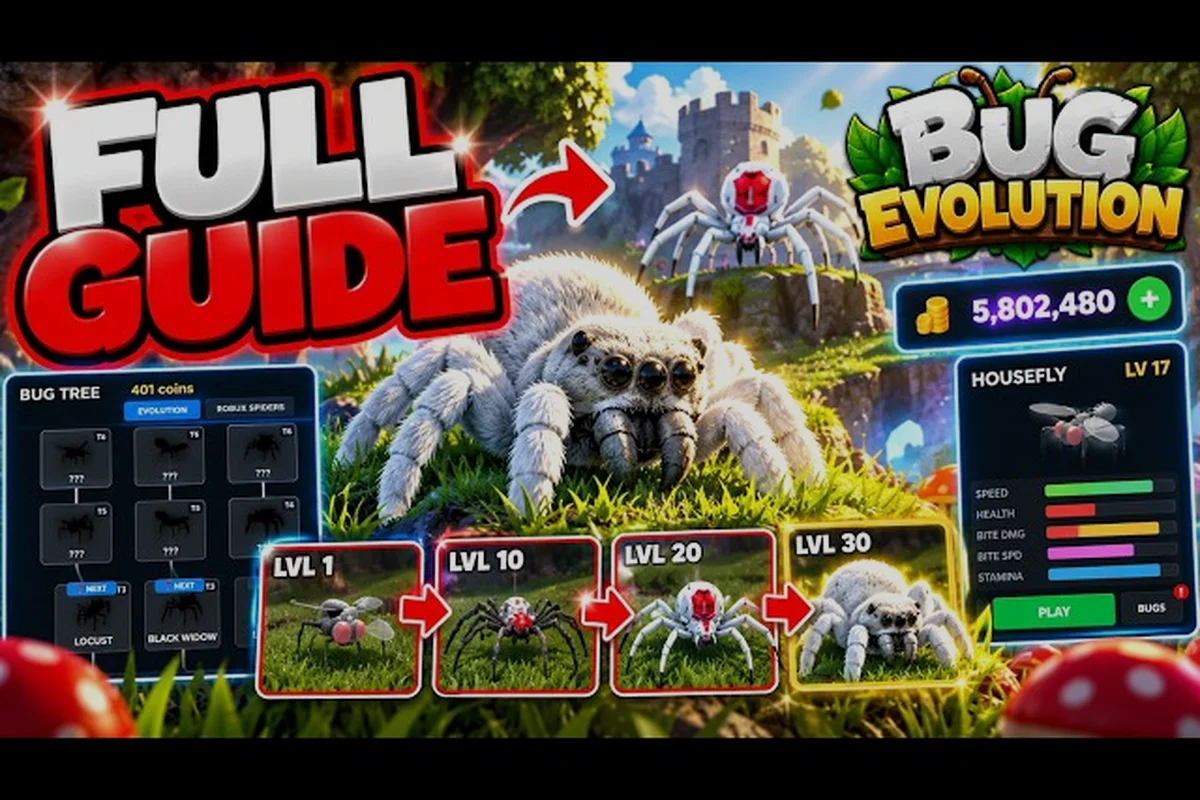
The early progression loop is straightforward: hatch, consume nearby food, reach level 10, and evolve into the spider stage. Once you understand that rhythm, the controls become a means of reaching food safely rather than a separate skill to master. The Bug Evolution beginner guide provides a broader look at the opening stages and progression goals.
Bug Evolution Menu Guide: Understanding Every Screen
The interface is designed around a compact HUD, with five stat bars, a gold coin bar, your current insect name and level, a Bugs tab, and a Bug Tree button. The Bug Tree opens evolution choices, while the Bugs tab displays collected insect forms. A Robux Spiders tab sits beside the normal roster in the menus.
Menus pause your immediate decision-making on mobile, so open them during a safe pause or after collecting enough nearby food. Do not enter the Bug Tree while a larger insect is closing in unless you are deliberately accepting the risk. A fast menu check is useful, but losing health because the camera stayed fixed is not.
| Interface element | What it displays | Practical use |
|---|---|---|
| Speed bar | Movement capability | Watch before crossing exposed ground |
| Health bar | Current damage remaining | Leave a fight before it reaches zero |
| Bite Damage bar | Attack power | Compare upgrade potential before buying |
| Bite Speed bar | Attack frequency | Reduce the duration of fights |
| Stamina bar | Movement and action endurance | Stop before exhaustion catches you |
| Gold coin bar | Current spendable coins | Save for meaningful upgrades |
| Bug Tree button | Evolution path and requirements | Check the next form before saving |
| Bugs tab | Collected insect roster | Review forms unlocked during the session |
Scanning the HUD Quickly
Glance at the top or side of the screen for your insect’s name and level, then check the five stat bars only when your situation changes. If a predator appears, Health and Stamina matter most. If you have gathered coins, compare Bite Damage and Bite Speed before spending. During exploration, Speed may deserve more attention than a full-screen menu check.
This is also where the Bug Evolution interface guide becomes practical: treat the HUD as a live decision panel, not decoration. A falling Health bar indicates a retreat, a low Stamina bar suggests avoiding another chase, and a healthy coin total may justify an upgrade. If the bars are small on your display, bright outdoor scenes can make them harder to read, so lower camera movement helps you keep the relevant indicator in view.
Picking the Right Evolve Moment
The most common early mistake is evolving before saving enough coins. Evolution improves your form, but entering a new tier without upgrades can leave you vulnerable after reaching a more competitive area. Aim to reach level 10, secure the spider evolution, then purchase at least level 1 Bite Damage before moving toward another Bug Tree node.
Use the coin-before-evolution rule: keep spending money only when you have a clear upgrade target, and delay evolution when a costly node is nearly within reach. The first-session progression guide explains how food, coins, and early upgrades fit together more completely.
Bug Evolution Interface Guide: Using Coins and Upgrades
Coins come from the food-and-combat loop, while upgrades determine how efficiently your insect turns those resources into damage. The HUD highlights Bite Damage and Bite Speed as the first combat stats, and Stamina matters during chases and repeated bites. A mobile player should therefore treat coins as a set of choices, not as a score to spend immediately.
| Upgrade priority | When it matters | Mobile-friendly reason |
|---|---|---|
| Bite Damage, level 1 | Before risky fights | Shortens the number of attacks needed |
| Bite Speed | When opponents repeatedly escape | Increases attack frequency |
| Stamina management | During movement or combat | Prevents exhaustion while escaping |
| Additional bug forms | After the opening upgrade | Expands your late-session options |
| Robux Spiders tab | Optional purchase only | Separate from normal progression choices |
Spending coins without a delayed fight
A level 1 Bite Damage purchase is the safest opening upgrade because it gives immediate value before you push into danger. Test the new damage in a low-risk area, watch how quickly the opponent loses Health, and then decide whether Bite Speed deserves the next purchase. The order works well because it avoids both the no-coins trap and the slow-fight problem that drains Stamina.
Attack frequency matters as much as raw power. If two insects have similar Bite Damage, the one with better Bite Speed may secure the quicker kill and preserve Stamina. Conversely, spending every coin on speed when opponents have far more health can lengthen fights. Balance is therefore more useful than maximizing one bar.
Keeping the screen readable
Your phone display determines how much visual information you can absorb while moving. Do not repeatedly zoom the camera close to the interface, because that reduces awareness of the surrounding field. Keep the camera slightly farther out during feeding routes, then move it closer only when the action button is consistently failing to connect with food.
The best Bug Evolution menu guide habit is simple: confirm what the menu says, close it immediately, and return to the field. Menu familiarity prevents the common failure of scrolling through every tab during combat. Keep Bugs for roster checks and Bug Tree for planned evolution decisions, and avoid opening either when an opponent is already attacking.
Bug Evolution Tips and Tricks for Faster Mobile Progress
Fast progression comes from avoiding wasted movement, keeping a coin reserve, and using terrain to reduce the number of attacks you need. A small fly can still survive a dangerous zone if it approaches food from behind, eats quickly, and leaves before larger insects turn. The objective is not to avoid every challenge; it is to choose favorable challenges.
| Common mistake | Consequence | Better mobile routine |
|---|---|---|
| Evolving too early | No coins for Bite Damage | Evolve near level 10, then buy level 1 damage |
| Chasing rare food | Long exposure to predators | Eat nearby food before crossing open ground |
| Ignoring Bite Speed | Fights drag and drain Stamina | Add speed after the first damage upgrade |
| Constant camera spinning | Food is missed and threats go unnoticed | Use short, deliberate camera drags |
| Checking menus mid-fight | You lose awareness of an approaching insect | Pause only in a safe area |
Use a two-route feeding pattern
Alternate between a safe inner route and an occasional outer route. The inner route provides reliable food and low risk, while the outer route can offer better hunting opportunities or access to distant Bug Tree nodes. Return to the inner route whenever your Health or Stamina drops, and do not let an attractive rare item pull you deep into hostile territory.
This two-route system also makes camera control more predictable. Players naturally learn where predators appear along each path, so they can turn the camera toward a known danger before entering it. That small preparation reduces the chance of an avoidable ambush.
Use the action button deliberately
One tap should equal one intended attempt. Holding the button or tapping repeatedly does not make food disappear faster, and it can leave your insect oriented awkwardly. Face the target, confirm that it occupies the center of the screen, and then tap. If the bite misses, realign before trying again.
The same discipline applies to combat. Approach at an angle, avoid standing directly in front of a larger insect, and leave room to circle away. The Bite Speed stat can reduce fight duration, but positioning determines whether you get clean attacks at all.
Bug Evolution Pro Tips for Busy Touchscreen Sessions
The best pro tips focus on conserving attention. Your thumb cannot steer, inspect the HUD, and scan for enemies equally well at the same time. Choose one primary movement thumb and use short camera drags with the other. If your device supports a more sensitive touch response, adjust that through Roblox’s standard settings rather than relying on frantic repeated taps.
Community experiences emphasize the same early priorities reported by players: build a coin buffer, improve combat stats, and expand your food route only after the opening loop feels secure. Community guides also emphasize the Bug Tree and collected roster as central progression tools, even though the game itself does not require menu-heavy play.
| Session situation | Best use of the interface | Result |
|---|---|---|
| First minute | Check HUD once, then eat nearby food | Learn the basic loop |
| Before level 10 | Monitor coins and nearby threats | Prepare for spider evolution |
| After evolution | Buy Bite Damage level 1 | Reduce fight length |
| During a safe pause | Review Bugs and Bug Tree | Confirm next options |
| Late in a server | Check stat bars and remaining stamina | Avoid an unnecessary death |
Play solo first, then coordinate
Solo play gives a new mobile player time to learn the joystick, action button, and camera without another teammate competing for the same food. Once that control pattern is stable, teaming up becomes more valuable because teammates can cover different feeding routes and share fights.
A team should still assign simple priorities: one player can pull an opponent while another collects nearby food, and neither should buy randomly during a shared fight. For broader survival decisions, the solo and survival guide covers how positioning and resource management affect an entire round.
Protect your attention during crowded scenes
When several insects enter the same area, slow down rather than speeding up. Face one target, take the shortest route around larger bodies, and avoid rotating the camera through full circles. Circular movement can make a threat difficult to track and cause repeated collisions. Short arcs around the perimeter are easier to correct.
If the display feels crowded, keep the camera farther away and reduce visual precision requirements. You do not need to see every edge of the field to eat, evade, or align a bite. Preserving awareness is more valuable than obtaining a perfect close-up view.
Frequently Asked Questions
How do I move and eat in Bug Evolution on mobile?
Use the virtual joystick to move your insect and drag the camera to face nearby food. Tap the action button when the target is aligned in front of you. Start with small food in the spawn-area grass fields because it is easier to reach, then widen your route once the movement and biting rhythm feels comfortable.
What does the Bug Tree button do?
The Bug Tree button opens the evolution interface, where you can review available insect forms and progression requirements. Open it when your insect reaches the appropriate level, especially level 10 for the spider stage. Check your coin balance before committing because evolving without money for early upgrades can leave you vulnerable.
Which upgrade should I purchase first on mobile?
Bite Damage level 1 is the strongest opening purchase because it helps you finish fights with fewer attacks. Add Bite Speed when opponents repeatedly escape or when fights drain your Stamina. Keep a coin reserve and avoid spending every coin immediately after evolving, since the next food route may be much more dangerous.
How do I use the Bugs and Robux Spiders tabs?
The Bugs tab shows your collected insect roster and helps you track forms unlocked during the session. The Robux Spiders tab is a separate optional purchase area, so review it only if you intend to spend Robux. Neither tab should be opened during an active chase because leaving the field visible can cost you a health advantage.
Why does my character miss food on mobile?
Missing food usually comes from camera alignment, touch timing, or moving too close to an obstacle. Face the item, stop adjusting the camera, and make one deliberate action-button tap. Keep the view slightly farther out and use short camera drags; repeatedly spinning the camera can redirect your insect after the tap has already started.